无需 Docker 设置,在线体验 Odysseus
在线体验 Odysseus
无需安装
Odysseus Online 是免费的托管演示平台,让你无需 Docker 安装即可体验 Odysseus AI 工作区。可在浏览器中试用 AI 聊天、自治 Agent、深度研究、文件管理、记忆、模型对比和自托管工作流。
体验自托管 AI 工作区用户最关心的核心流程。
先试用浏览器演示,再克隆 GitHub 并运行 Docker 安装。
在一个界面中查看模型对比、文件、记忆、工具和研究示例。
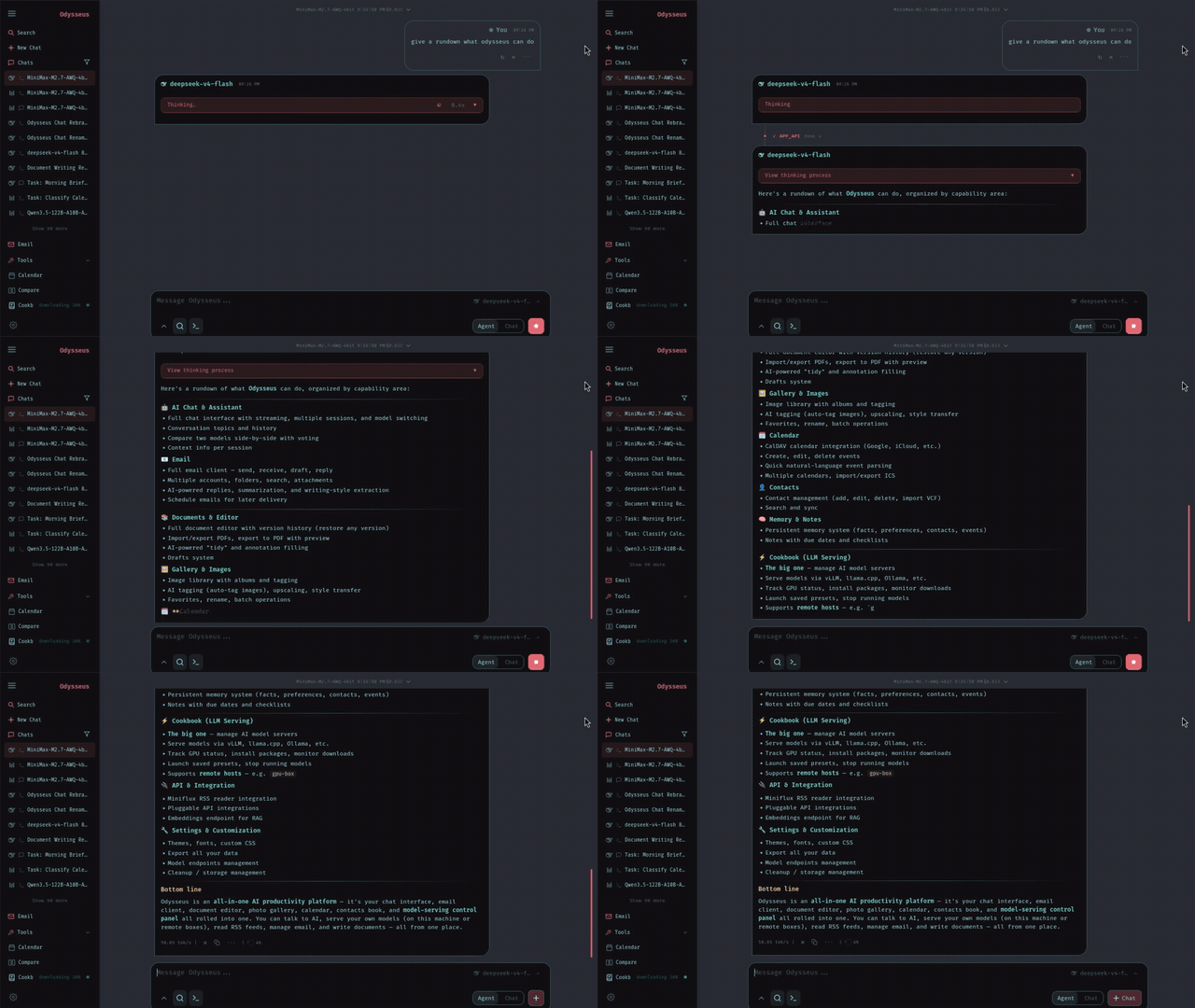
真实 Tour:聊天、Agent、研究、对比、文档和任务
Chat & Agents
与任意本地模型或 API 对话,也可以把工具交给 Agent,让它完成整段任务。
自托管前先完整评估 Odysseus
托管演示聚焦用户高频搜索的工作流:AI 聊天、自治 Agent、深度研究、文件、记忆、模型对比和 Docker 设置指南。
Chat and autonomous agents
Start with regular AI chat, then hand tasks to agents that can plan, use tools, and work through multi-step requests.
Files, documents, notes, and tasks
Odysseus is a workspace, not only a chat box. The demo shows how files and task context become part of the AI workflow.
Model comparison and provider flexibility
Compare model responses and learn how Odysseus connects to local models or external endpoints when self-hosted.
Hosted browser demo
Try the Odysseus experience online before touching Docker, environment variables, or server setup.
Deep research workflows
Run multi-step research examples that gather sources, synthesize findings, and turn them into readable reports.
Docker and GitHub install path
Use the tutorial flow to move from hosted evaluation to the official self-hosted Odysseus repository.
从在线演示到你自己的 Odysseus 工作区
Odysseus Online 是低门槛第一步。先理解产品,再在需要本地控制时进入开源 GitHub 项目。
Hosted first, self-hosted when ready
The online workspace reduces the guesswork. Once you know the modules you need, the Docker install becomes a planned next step instead of a blind setup.
现在体验模型工作流,之后保留自托管控制权
The hosted demo helps you understand Odysseus workflows. The self-hosted project is for users who want their own hardware, model endpoints, local data, and privacy-first operation.
Multiple model workflows
Test chat and comparison flows so you can decide which local or API-backed models make sense for your own workspace.
Hosted evaluation
Use the online demo for quick product evaluation, tutorials, and first-run learning before setting up Docker.
Bring your own endpoints
When self-hosting, connect your preferred model providers or local runtimes according to the official Odysseus setup path.
聊天、Agent、研究、文件、记忆和任务集中在一个界面
Odysseus is positioned as a full AI workspace. The hosted experience keeps the major modules visible so users can understand how the pieces fit before installing locally.
Chat and agents
Move from direct model conversations to agentic tasks with tools, files, and planning.
Research and compare
Run research-style workflows and compare model outputs before committing to a self-hosted model stack.
Files and daily work
Use files, notes, documents, and tasks as part of the workspace rather than keeping context scattered across tools.
Agent states
Track AI work from request to report
The agent is reading context, using tools, and building an answer.
A task is waiting for workspace resources or the next available run.
A workflow can wait while you review setup choices or inputs.
Errors and missing context are surfaced so the next step is clear.
当托管演示符合需求后,再本地安装 Odysseus
The tutorial path connects the hosted demo to the official GitHub repository and Docker setup. Use it when you are ready for a private, local-first AI workspace.
Try the hosted demo
Use Odysseus Online to inspect chat, agents, research, documents, memory, and model comparison before installing.
Clone the GitHub project
Open the official repository and pull the source when you are ready to self-host.
Start with Docker Compose
Use the Docker path from the project README to launch the workspace and review startup logs.
Configure models and tools
After the instance is running, connect model endpoints, tool access, search, files, and workspace preferences.
选择适合评估阶段的托管工作区路径
从免费演示开始;如需托管工作区访问、更多引导用量或团队评估时间,可选择可选方案。
简单、透明的定价
选择最适合您的方案。所有方案均包含核心功能的访问权限。
标准版
适合在线评估 Odysseus 的个人用户。
- 访问托管 Odysseus 工作区
- 聊天、Agent、研究和文件工作流
- 按积分运行工作区任务
- 优先工作区处理
- 导出工作区结果
- 私有工作区历史
- 标准工作区队列
- 个人与团队评估
专业版
适合运行更多 Odysseus 工作区任务的用户。
- 访问托管 Odysseus 工作区
- 聊天、Agent、研究和文件工作流
- 更高的月度工作区积分池
- 优先工作区处理
- 适合更多引导式工作区任务
- 工作区与 API 访问
- 快速工作区队列
- 优先支持
终极版
适合高频评估 Odysseus 的团队。
- 访问托管 Odysseus 工作区
- 聊天、Agent、研究和文件工作流
- 最大的月度积分池
- 优先工作区处理
- 团队规模使用
- 工作区访问与支持
- 即时工作区队列
- 工作区与 API 访问
常见问题
面向搜索 Odysseus online、Odysseus demo、Odysseus Docker 和自托管 AI 工作区设置的用户。
面向正在评估自托管 AI 工作区的人
当你想在投入本地部署、模型配置或服务器设置前先理解产品,Odysseus Online 最有价值。
关于 Odysseus Online、托管演示或自托管路径有问题?
你可以咨询演示访问、教程反馈、托管工作区和本地安装前的实际问题。