Docker 設定なしで Odysseus をオンライン体験
Odysseus をオンラインで体験
インストール不要
Odysseus Online は、Docker をインストールせずに Odysseus AI ワークスペースを試せる無料のホスト型デモです。AI チャット、自律 Agent、深層リサーチ、ファイル管理、メモリ、モデル比較、自ホスト型 AI ワークフローをブラウザで確認できます。
自ホスト型 AI ワークスペースで重視される主要フローを確認できます。
ブラウザデモを試してから GitHub を clone し、Docker インストールへ進めます。
モデル比較、ファイル、メモリ、ツール、リサーチ例をひとつの画面で確認できます。
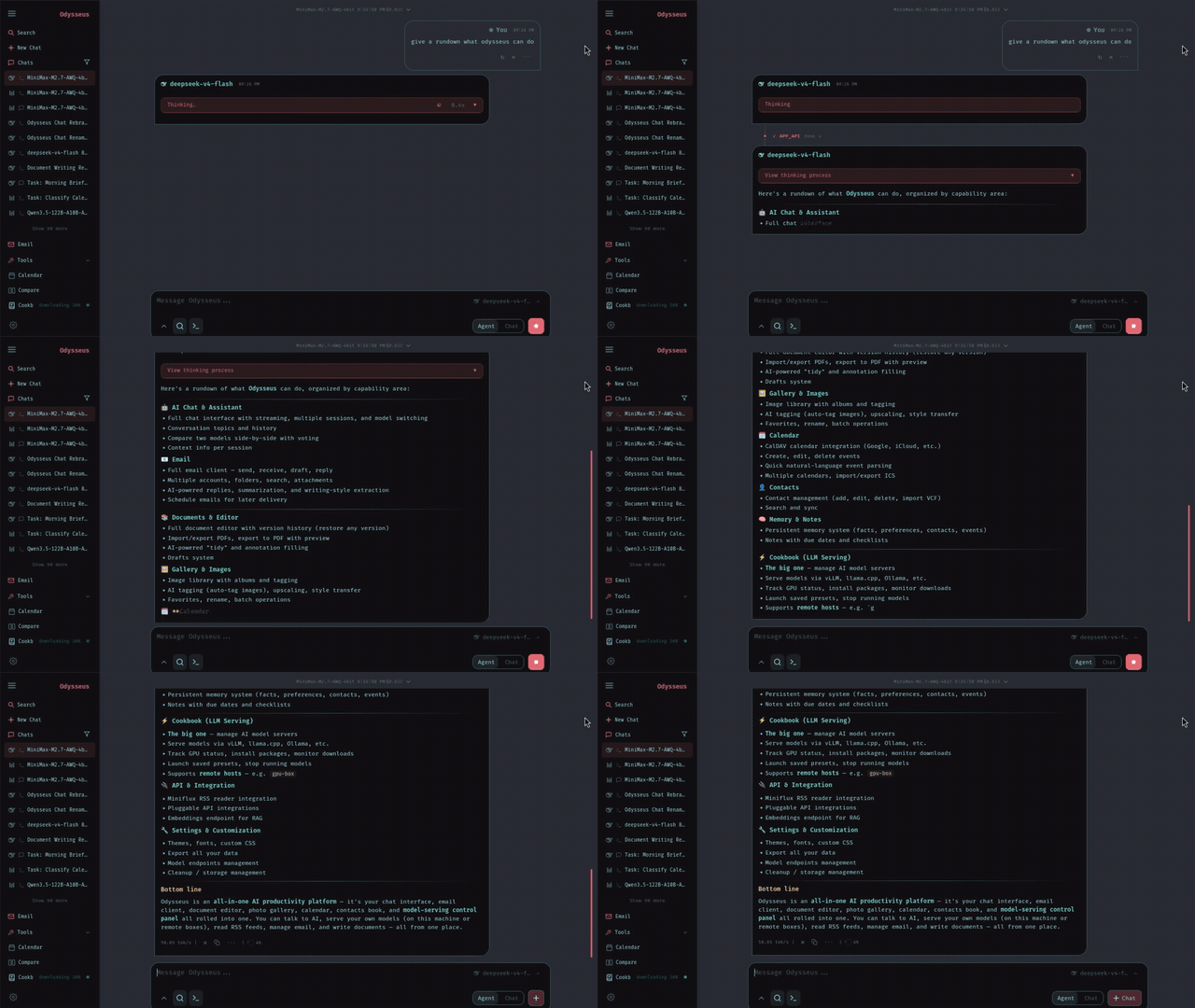
実際のツアー: チャット、Agent、リサーチ、比較、ドキュメント、タスク
Chat & Agents
任意のローカルモデルや API と会話し、Agent にツールを渡してタスクを進められます。
自ホスト前に Odysseus をしっかり評価できます
ホスト型デモでは、AI チャット、自律 Agent、深層リサーチ、ファイル、メモリ、モデル比較、Docker セットアップガイドに重点を置いています。
Chat and autonomous agents
Start with regular AI chat, then hand tasks to agents that can plan, use tools, and work through multi-step requests.
Files, documents, notes, and tasks
Odysseus is a workspace, not only a chat box. The demo shows how files and task context become part of the AI workflow.
Model comparison and provider flexibility
Compare model responses and learn how Odysseus connects to local models or external endpoints when self-hosted.
Hosted browser demo
Try the Odysseus experience online before touching Docker, environment variables, or server setup.
Deep research workflows
Run multi-step research examples that gather sources, synthesize findings, and turn them into readable reports.
Docker and GitHub install path
Use the tutorial flow to move from hosted evaluation to the official self-hosted Odysseus repository.
オンラインデモから自分の Odysseus ワークスペースへ
Odysseus Online は最初の低負荷なステップです。製品を理解してから、必要に応じて GitHub のオープンソースプロジェクトへ進めます。
Hosted first, self-hosted when ready
The online workspace reduces the guesswork. Once you know the modules you need, the Docker install becomes a planned next step instead of a blind setup.
今はモデルワークフローを試し、後で自ホストの管理権を持てます
The hosted demo helps you understand Odysseus workflows. The self-hosted project is for users who want their own hardware, model endpoints, local data, and privacy-first operation.
Multiple model workflows
Test chat and comparison flows so you can decide which local or API-backed models make sense for your own workspace.
Hosted evaluation
Use the online demo for quick product evaluation, tutorials, and first-run learning before setting up Docker.
Bring your own endpoints
When self-hosting, connect your preferred model providers or local runtimes according to the official Odysseus setup path.
チャット、Agent、リサーチ、ファイル、メモリ、タスクをひとつの画面に
Odysseus is positioned as a full AI workspace. The hosted experience keeps the major modules visible so users can understand how the pieces fit before installing locally.
Chat and agents
Move from direct model conversations to agentic tasks with tools, files, and planning.
Research and compare
Run research-style workflows and compare model outputs before committing to a self-hosted model stack.
Files and daily work
Use files, notes, documents, and tasks as part of the workspace rather than keeping context scattered across tools.
Agent states
Track AI work from request to report
The agent is reading context, using tools, and building an answer.
A task is waiting for workspace resources or the next available run.
A workflow can wait while you review setup choices or inputs.
Errors and missing context are surfaced so the next step is clear.
ホスト型デモが合えば、Odysseus をローカルにインストールできます
The tutorial path connects the hosted demo to the official GitHub repository and Docker setup. Use it when you are ready for a private, local-first AI workspace.
Try the hosted demo
Use Odysseus Online to inspect chat, agents, research, documents, memory, and model comparison before installing.
Clone the GitHub project
Open the official repository and pull the source when you are ready to self-host.
Start with Docker Compose
Use the Docker path from the project README to launch the workspace and review startup logs.
Configure models and tools
After the instance is running, connect model endpoints, tool access, search, files, and workspace preferences.
評価段階に合うホスト型ワークスペースを選べます
無料デモから始め、必要に応じて管理されたワークスペースアクセスやチーム評価向けの任意プランを利用できます。
シンプルで透明な価格設定
あなたに最適なプランをお選びください。すべてのプランに主要機能へのアクセスが含まれています。
スタンダード
Odysseus をオンラインで評価する個人向け。
- ホスト型 Odysseus ワークスペースにアクセス
- チャット、Agent、リサーチ、ファイルワークフロー
- クレジットベースのワークスペース実行
- 優先ワークスペース処理
- ワークスペース出力のエクスポート
- プライベートなワークスペース履歴
- 標準ワークスペースキュー
- 個人とチームの評価に対応
プロ
より多くの Odysseus ワークスペースタスクを実行するユーザー向け。
- ホスト型 Odysseus ワークスペースにアクセス
- チャット、Agent、リサーチ、ファイルワークフロー
- より多い月間ワークスペースクレジット枠
- 優先ワークスペース処理
- より多くのガイド付きワークスペースタスク
- ワークスペースと API アクセス
- 高速ワークスペースキュー
- 優先サポート
マックス
Odysseus を高頻度に評価するチーム向け。
- ホスト型 Odysseus ワークスペースにアクセス
- チャット、Agent、リサーチ、ファイルワークフロー
- 最大の月間クレジット枠
- 優先ワークスペース処理
- チーム規模の利用に対応
- ワークスペースアクセスとサポート
- 即時ワークスペースキュー
- ワークスペースと API アクセス
よくある質問
Odysseus online、Odysseus demo、Odysseus Docker、自ホスト型 AI ワークスペース設定を探している方向けの回答です。
自ホスト型 AI ワークスペースを評価する方向けです
ローカル導入、モデル設定、サーバー構築に時間を使う前に製品を理解したい場合、Odysseus Online が役立ちます。
Odysseus Online、ホスト型デモ、自ホスト手順について質問がありますか?
デモアクセス、チュートリアルへのフィードバック、ホスト型ワークスペース、ローカル導入前の実務的な相談に対応します。